Stencil Buffer
Related Topics: Frame Buffer Object (FBO)
Download: StencilTest.zip
Overview
After fragments are generated by a fragment shader and rasterization process in OpenGL rendering pipeline, several fragment operations are performed by GPU; scissor test, alpha test, stencil test and depth test. If a fragment passes all the fragment tests, the fragment is finally written to the frame buffer as a pixel.
OpenGL provides a separate stencil buffer along with color and depth buffers, which is used to create a stencil mask and to draw only desired area with the stencil mask, such as drawing outlines of objects, decals, reflection, shadows, etc. This page explains how to write to the stencil buffer and how the stencil function works.
Create Stencil Buffer
To use stencil buffer, you need to request the stencil buffer during creating OpenGL rendering context (RC).
With GLUT (or freeglut), include GLUT_STENCIL token in glutInitDisplayMode(). With glfw framework, call glfwWindowHint() with GLFW_STENCIL_BITS token before creating an OpenGL window. Or, if you are using Win32 API directly, check PIXELFORMATDESCRIPTOR.cStencilBits is greater than 0 with DescribePixelFormat() call.
Stencil buffer is normally 8-bit long (8 bitplanes) per pixel and paired with the 24-bit depth buffer. So, it is total 32 bit long combined depth (24) and stencil (8) buffers together for performance optimization. You can check the number of stencil bits by calling glGetIntegerv() with GL_STENCIL_BITS token after the OpenGL window is created.
// for GLUT or freeglut
glutInit(&argc, argv);
glutInitDisplayMode(GLUT_RGBA | GLUT_DOUBLE | GLUT_DEPTH | GLUT_STENCIL);
glutInitWindowSize(windowWidth, windowHeight);  // window size
glutCreateWindow(argv[0]);                      // param is the title of window

// for glfw
glfwInit();
glfwWindowHint(GLFW_STENCIL_BITS, 8);
glfwCreateWindow(windowWidth, windowHeight, argv[0], 0, 0);

// for WIN32 API
HDC hdc = ::GetDC(winHandle);
int pixelFormat, currMode;
PIXELFORMATDESCRIPTOR pfd;
::DescribePixelFormat(hdc, currMode, sizeof(pfd), &pfd); // iterate all modes
if(pfd.cStencilBits >= 8)
    pixelFormat = currentMode;
...
::SetPixelFormat(hdc, pixelFormat, &pfd);

// check stencil buffer
glGetIntegerv(GL_STENCIL_BITS, &stencilBits);
Stencil Functions
OpenGL provides 2 major APIs to create the stencil mask and to perform the stencil operations (write and test): glStencilFunc() and glStencilOp(). Plus, you need to enable the stencil test with glEnable(GL_STENCIL_TEST) before using these functions. Otherwise, the stencil test is ignored.
glStencilFunc()
void glStencilFunc(GLenum func, GLint ref, GLuint mask)
glStencilFunc() defines the comparison logic with the given parameters during the stencil mask creation and testing.
The first parameter, func is to define how to compare the second parameter, ref with the value already in the stencil buffer, for example, equal, less than or greater than, etc. The available comparison functions are;
- GL_ALWAYS: Always pass the test regardless the ref. value (commonly used during stencil creation)
- GL_NEVER: Always fail the test
- GL_EQUAL: Test if ref equals to the stencil value
- GL_NOTEQUAL: Test if ref is not equal to the stencil value
- GL_LESS: Test if ref is less than the stencil value
- GL_LEQUAL: Test if ref is less than or equal to the stencil value
- GL_GREATER: Test if ref is greater than the stencil value
- GL_GEQUAL: Test if ref is greater than or equal to the stencil value
The third parameter, mask is specially used to perform the comparison test conditionally, acting as bitplanes. For example, the first bitplane in the stencil buffer for drawing the outlines, the second bitplane for drawing reflection area only, and so on. Suppose the stencil buffer is 8 bits and the mask are all set to 1, the mask value will be 1111,1111b (or 0xFF in hex). For this case, normal numeric comparison is performed.
However, if some bitplanes are conditionally on, it performs a bitwise AND operation on the ref and the stencil value first. Then, performs the comparison with the results. For example with GL_EQUAL function;
(ref & mask) = (stencil value & mask)
If the mask is 0000,0001 (0x01) and the value in the stencil buffer is 1, then the following ref values are all passed for the GL_EQUAL test because of the bitwise AND operator.
  0001    // ref = 1 in decimal
& 0001    // mask
------
     1    // AND op result

  0011    // ref = 3 in decimal
& 0001    // mask
------
     1    // AND op result

  0101    // ref = 5 in decimal
& 0001    // mask
------
     1    // AND op result

  0111    // ref = 7 in decimal
& 0001    // mask
------
     1    // AND op result
...
glStencilOp()
void glStencilOp(GLenum sFail, GLenum dFail, GLenum dPass)
glStencilOp() specifies which action will be applied (written) to the stencil buffer after the comparison test is passed or failed. The parameters of glStencilOp() are;
- sFail: Action for when the stencil test is failed
- dFail: Action for when the stencil test is passed but depth test is failed
- dPass: Action for when both the stencil and depth tests are passed
The available actions for each parameter are;
- GL_KEEP: Keep the current value in the stencil buffer (commonly used during stencil test)
- GL_REPLACE: Write the ref value to the stencil buffer
- GL_ZERO: Write 0 to the stencil buffer
- GL_INVERT: Bitwise invert the current stencil value
- GL_INCR: Increment the current stencil value by 1
- GL_INCR_WRAP: Increment the current stencil value, Wrap the value to 0 if it exceeds the max
- GL_DECR: Decrement the current stencil value by 1
- GL_DECR_WRAP: Decrement the current stencil value, Wrap the value to the max if it is less than 0
Note that the ref parameter from glStencilFunc() is used for only GL_REPLACE action to write it to the stencil buffer.
OpenGL also provides glStencilOpSeparate() and glStencilOpSeparate() to apply the stencil function to the front and back frame buffers separately.
Example: Stencil Test
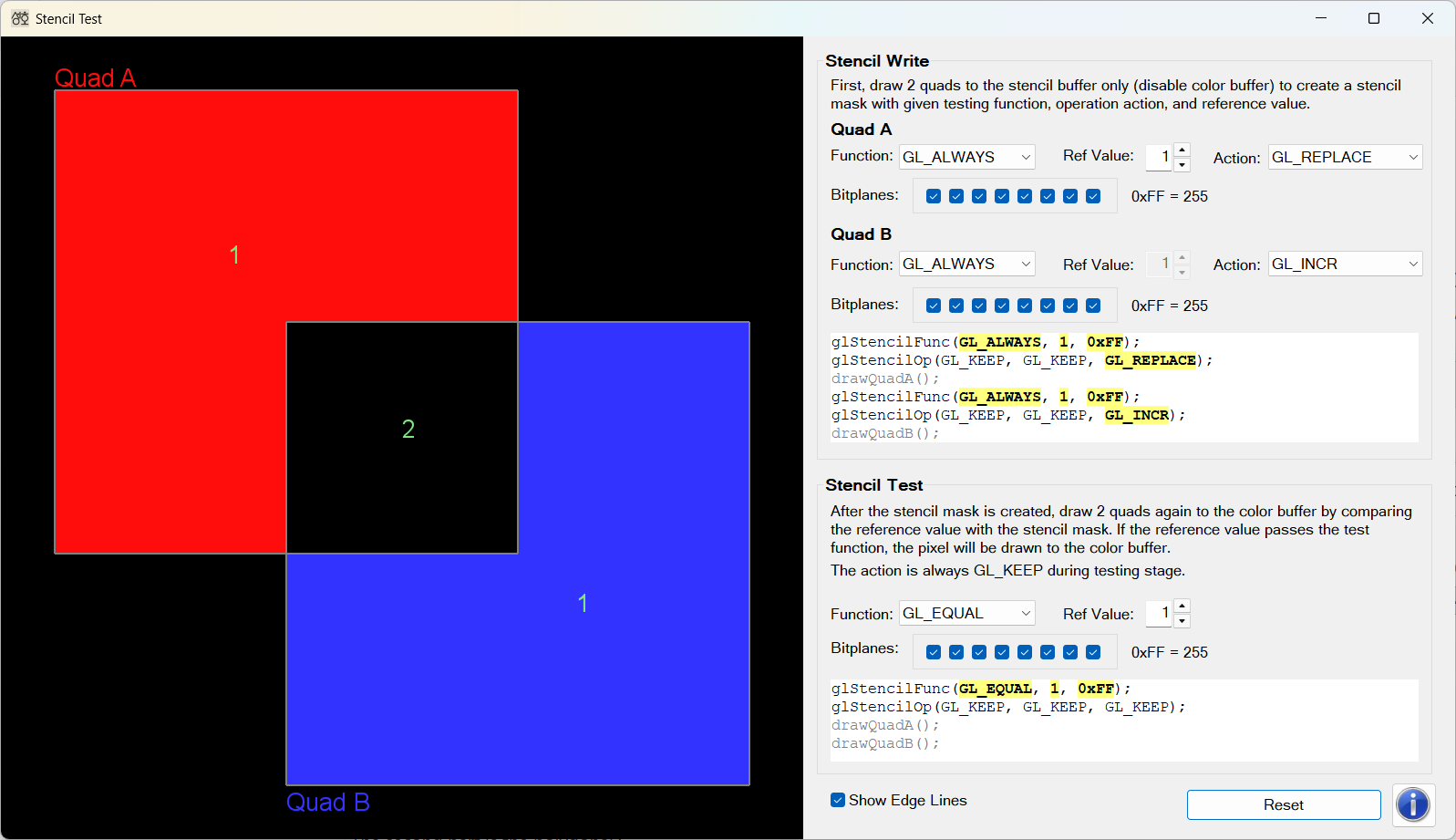
Download binary:
StencilTest.zip (Updated 2026-08-02)
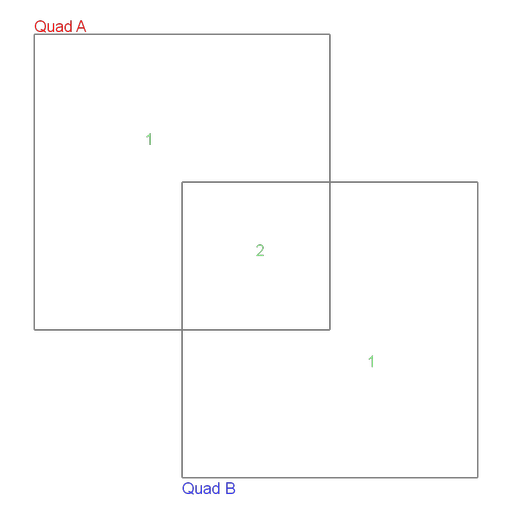
This application is 2-pass rendering; draws 2 quads onto the stencil buffer first to create the stencil mask with user-defined stencil function, reference value and operation action, and then draw the quads again to the frame buffer by performing the stencil test. The only area where the stencil test is passed will be drawn onto the frame buffer.
You can change func, ref, actions, and bitplanes (mask) parameters to see different rendering results. The code snippet for this 2-pass rendering is;
// enable stencil buffer
glEnable(GL_STENCIL_TEST);

// PASS1: write to stencil buffer only ====================
glColorMask(GL_FALSE, GL_FALSE, GL_FALSE, GL_FALSE); // disable writing to color buffer
glStencilFunc(func1, ref1, mask1);
glStencilOp(GL_KEEP, GL_KEEP, action1); // write if both stencil/depth tests are passed
drawQuadA();
glStencilFunc(func2, ref2, mask2);
glStencilOp(GL_KEEP, GL_KEEP, action2); // write if both stencil/depth tests are passed
drawQuadB();

// PASS2: write to color buffer by stencil test ===========
glColorMask(GL_TRUE, GL_TRUE, GL_TRUE, GL_TRUE); // enable writing to color buffer
glStencilFunc(func3, ref3, mask3);
glStencilOp(GL_KEEP, GL_KEEP, GL_KEEP);          // only test without writing
drawQuadA();
drawQuadB();

// disable stencil buffer
glDisable(GL_STENCIL_TEST);
Suppose the stencil buffer is filled with 1 at the area where the 2 quads are drawn, and set to 2 where 2 quads are overlapped during the first pass drawing. The possible stenciling results with ref = 1 during the second pass are;
| Rendering Result | Stencil Function with Ref = 1 |
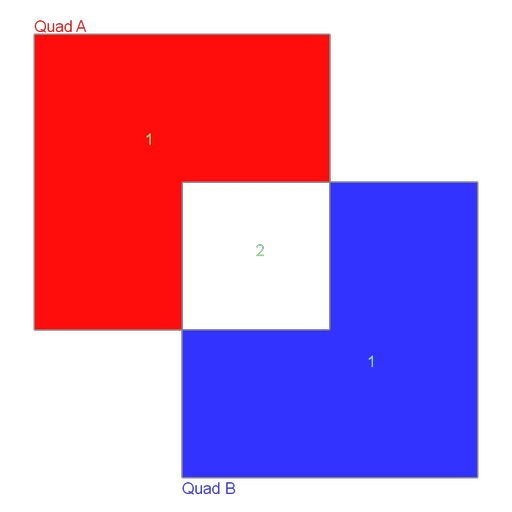 |
GL_EQUAL or GL_GEQUAL |
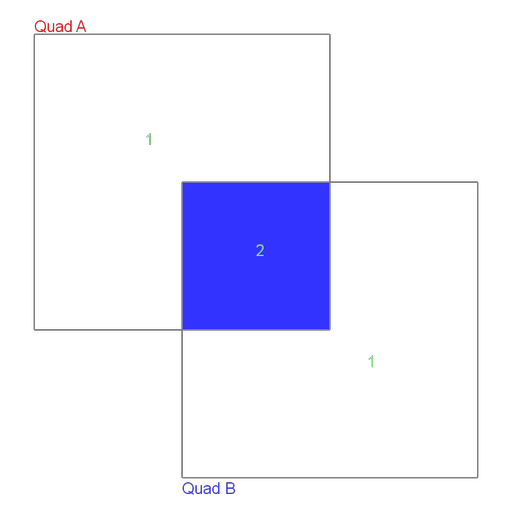 |
GL_LESS or GL_NOTEQUAL |
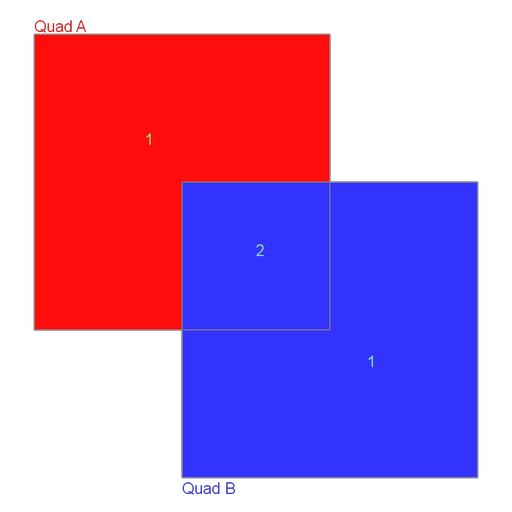 |
GL_LEQUAL or GL_ALWAYS |
 |
GL_GREATER or GL_NEVER |
Or, the stencil comparison tests for ref = 2 are passed with the following stencil functions;
| Rendering Result | Stencil Function with Ref = 2 |
|
GL_GREATER or GL_NOTEQUAL |
|
GL_EQUAL or GL_LEQUAL |
|
GL_GEQUAL or GL_ALWAYS |
|
GL_LESS or GL_NEVER |

