WebGL Clipping
Related Topics: Plane Equation, Vectors & Matrices
Overview
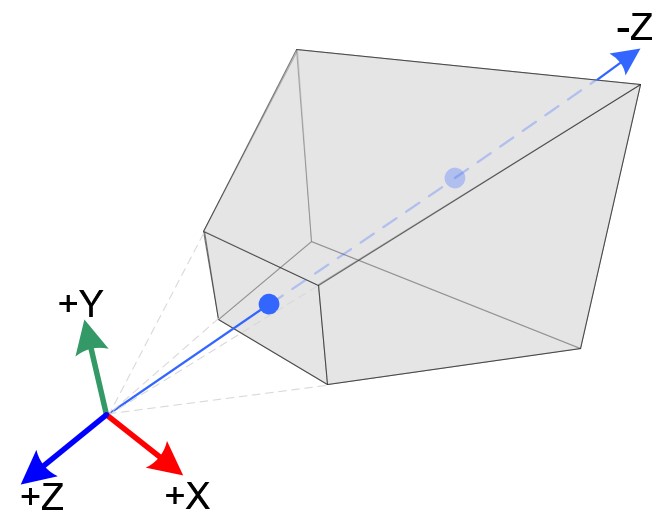
The projection matrix defines a viewing frustum with 6 clipping planes. After multiplying the projection matrix, the vertices will be clipped by the GPU if vertices are outside of the viewing frustum. (That is why it is called Clip Coordinates.)
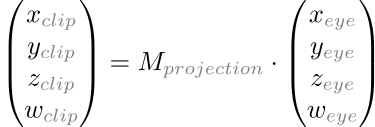
Sometimes, you may need additional clippings such as cross-section view, mirror or water rendering. This page explains how to perform custom culling with your own clipping planes.
User-Defined Custom Clipping Plane
First of all, you need to define a clipping plane. The plane equation can be defined by 4 cofficients, where the normal of the plane is (a, b, c) and a constant term is d.

Or, as 4D homogeneous coordinates;

Then, test each vertex  with the plane by substituting the vertex into the plane equation. If the result equals to 0, the vertex is on the plane. If it is positive, the vertex is above the clipping plane. If the result is negative (less than 0), the vertex is under the clipping plane. Therefore, you discard (not draw) the vertex if the result is less than 0.

Substituting a vertex to the plane equation is same as dot product of 2 vectors (sum of the products of same coordinate).

You can perform the clipping test at any time, but it is commonly processed in the eye space after multiplying the modelview matrix, or in the clip space after multiplying the projection matrix. The following example demonstrates custom clipping in the eye space.
Example: Clipping
This demo defines a clipping plane equation and performs a custom clipping with the plane in the eye space. It passes 4 coefficients of the custom clipping plane to the shader and performs clipping test in the fragment shader.
You may close (cap) the clipped opening by creating a stencil mask with the stencil buffer. Please see drawCap() function for detail.
Try to update the plane equation by changing the 4 coefficients of the plane equation and to rotate camera in the interface.
// define coefficients of a clipping plane: Ax + By + Cz + D = 0
let A = 1.0;
let B = 0.0;
let C = 0.0;
let D = 0.5;
let coeff = new Vector4(A, B, C, D);
...

// pass coefficients to the shader as Float32Array
program.uniform.clipCoeff = gl.getUniformLocation(program, "clipCoeff");
gl.uniform4fv(program.uniform.clipCoeff, coeff.toFloat32Array());
...
// uniforms
uniform vec4 clipCoeff;                 // (A,B,C,D) of the clip plane
....

// varying variables
varying vec4 eyePosition;
varying vec4 clipVec;
...

void main(void)
{
    // pass the vertex in eye space to fragment shader
    eyePosition = matrixModelView * vec4(vertexPosition, 1);
    clipVec = matrixNormal * clipCoeff;
    ...
}
// uniforms
uniform vec4 clipCoeff;                 // (A,B,C,D) of the clip plane
....

// varying variables
varying vec4 eyePosition;
varying vec4 clipVec;
...

void main(void)
{
    // custom clipping in eye space
    // if the vertex is under the plane, discard
    float dotClip = dot(eyePosition, clipCoeff);
    if(dotClip < 0.0)
        discard;
    ...
}
 Fullscreen Demo: test_clip.html
 GitHub Repo: test_clip.html

