WebGL Drawing Sphere
Related Topics: OpenGL Sphere,
VBO
Overview
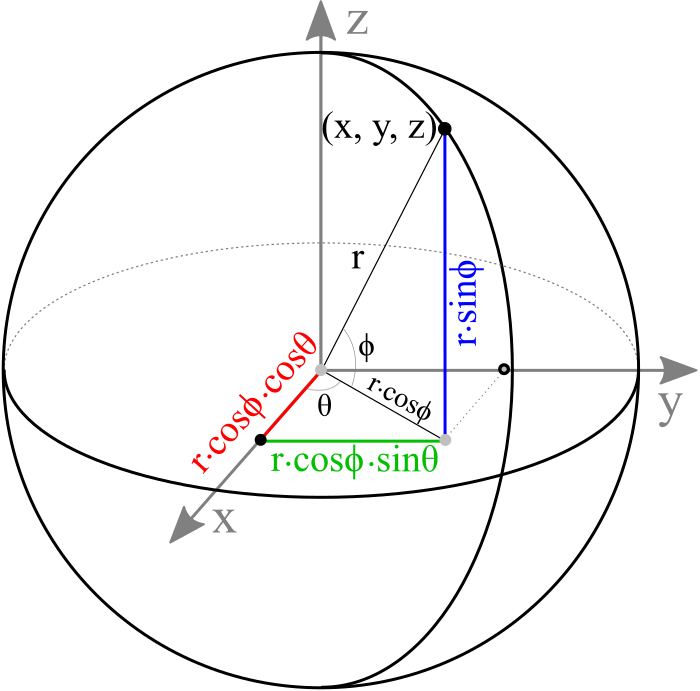
The parametric equation of a sphere is;
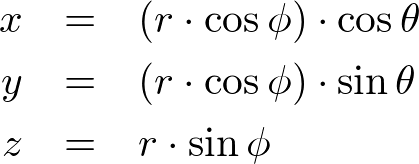
where  is the sector (longitude) angle and
  is the stack (latitude) angle. The range of the sector angle is from 0 to 360 degrees, and the stack angle is from -90 to 90 degrees.
Since we cannot draw all the points on a sphere, we only sample a limited amount of points by dividing the sphere by number of sectors and stacks. Then, simplify the sphere by connecting these sampled points together to form surfaces of the sphere.
Please see the details how to construct the vertices and triangles for a sphere.
Sphere Class
Sphere.js is a JavaScript class to construct a sphere geometry with the following parameters; radius, the number of sectors and stacks and surface smoothing flag. If no parameters are specified, it creates a sphere with default values (r=1, sectorCount=36, stackCount=18, smooth=true). Other main methods and properties of Sphere class are;
| Sphere | |
|---|---|
| Interface | Description |
| set() | Change all the parameters of the current instance at once |
| setRadius() | Change the radius of this |
| setSectorCount() | Change the number of sectors of this (Min. sector count is 2.) |
| setStackCount() | Change the number of stacks of this (Min. stack count is 2) |
| setSmooth() | Change the surface smoothness of this, true/false |
| getVertexCount() | Return the number of vertices |
| getIndexCount() | Return the number of indices |
| vboVertex | VBO ID of the vertex attributes for WebGL |
| vboIndex | VBO ID of the indices for WebGL |
Sphere class creates VBOs for rendering with WebGL when it is created, so no need to create VBO and to copy vertex data to VBO by yourself. A typical usage of this Sphere class follows;
let gl = {}; // global var

// create a sphere with default parameters
// radius=1, sectorCount=36, stackCount=18, smooth=true
gl.sphere = new Sphere(gl);
gl.sphere = new Sphere(gl, 1, 36, 18, true); // same as above


// can change params after creation
// radius=2, sectorCount=72, stackCount=36, smooth=false
gl.sphere.set(2, 72, 36, false);
...

// draw sphere with interleaved mode, V/N/T
let stride = gl.sphere.stride;
gl.bindBuffer(gl.ARRAY_BUFFER, gl.sphere.vboVertex);
gl.vertexAttribPointer(gl.program.attribute.position, 3, gl.FLOAT, false, stride, 0);
gl.vertexAttribPointer(gl.program.attribute.normal, 3, gl.FLOAT, false, stride, 12);
gl.vertexAttribPointer(gl.program.attribute.texCoord0, 2, gl.FLOAT, false, stride, 24);
gl.bindBuffer(gl.ELEMENT_ARRAY_BUFFER, gl.sphere.vboIndex);
gl.drawElements(gl.TRIANGLES, gl.sphere.getIndexCount(), gl.UNSIGNED_SHORT, 0);
Example: Drawing Sphere
This demo is drawing a sphere and it allows a user interact with its parameters.
 Fullscreen Demo: test_sphere.html
 GitHub Repo: test_sphere.html
Cubesphere Class
Cubesphere.js is a JavaScript class to construct a spherical geometry by subdividing a cube multiple times. If the subdivision is 1, it is same as a cube. The parameters of Cubesphere are; radius, the number of subdivisions and surface smoothing flag. If no parameters are specified, it creates a cubesphere with default values (r=1, subdivision=3, smooth=true). Other main methods and properties of Cubesphere class are;
| Cubesphere | |
|---|---|
| Interface | Description |
| set() | Change all the parameters of the current instance at once |
| setRadius() | Change the radius of this |
| setSubdivision() | Change the number of subdivisions of this |
| setSmooth() | Change the surface smoothness of this, true/false |
| getVertexCount() | Return the number of vertices |
| getIndexCount() | Return the number of indices |
| vboVertex | VBO ID of the vertex attributes for WebGL |
| vboIndex | VBO ID of the indices for WebGL |
Cubesphere class creates VBOs for rendering with WebGL when it is created, so no need to create separate VBO and to copy vertex data to the VBO by yourself.
To apply textures onto the cubesphere, you need load 6 cube maps with gl.TEXTURE_CUBE_MAP type. Use loadCubemap() utility function to load cube maps.
A typical usage of this class follows;
let gl = {}; // WebGL RC object

// create a cubesphere with default parameters
// radius=1, subdivision=3, smooth=true
gl.sphere = new Cubesphere(gl);
gl.sphere = new Cubesphere(gl, 1, 3, true);  // same as above

// you can change params after creation
// radius=2, subdivision=10, smooth=false
gl.sphere.set(2, 10, false);

// load 6 cube maps, GL_TEXTURE_CUBE_MAP
// +X: cubemap0.png
// -X: cubemap1.png
// +Y: cubemap2.png
// -Y: cubemap3.png
// +Z: cubemap4.png
// -Z: cubemap5.png
gl.tex = loadCubemap(gl, "cubemap.png");

// bind cubemap texture to cubesphere
gl.bindTexture(gl.TEXTURE_CUBE_MAP, gl.tex);
...

// draw sphere with interleaved mode, V/N/T
let stride = gl.sphere.stride;
gl.bindBuffer(gl.ARRAY_BUFFER, gl.sphere.vboVertex);
gl.vertexAttribPointer(gl.program.attribute.position, 3, gl.FLOAT, false, stride, 0);
gl.vertexAttribPointer(gl.program.attribute.normal, 3, gl.FLOAT, false, stride, 12);
gl.vertexAttribPointer(gl.program.attribute.texCoord0, 2, gl.FLOAT, false, stride, 24);
gl.bindBuffer(gl.ELEMENT_ARRAY_BUFFER, gl.sphere.vboIndex);
gl.drawElements(gl.TRIANGLES, gl.sphere.getIndexCount(), gl.UNSIGNED_SHORT, 0);
Example: Drawing Cubesphere
This demo is drawing a cubesphere using Cubesphere.js.
Fullscreen Demo: test_cubesphere.html
GitHub Repo: test_cubesphere.html, Cubesphere.js

